
GS504 – Feature Lifecycle and Applicability Rules in Globalization Studio
Welcome back! In the earlier parts of this series:
- GS501 – What is Globalization Studio? explained the big picture.
- GS502 – Connecting to Dataverse Repository helped you understand the setup.
- GS503 – Getting Started with the Workspace gave you a visual walkthrough of each tile and section.
In this part, we’ll focus on something every D365FSCM architect must understand:
How a feature moves through its lifecycle and
How Dynamics knows when and for whom to run that feature.
🧠 What is a Globalization Feature?
Think of a Globalization Feature like a recipe for handling compliance automation:
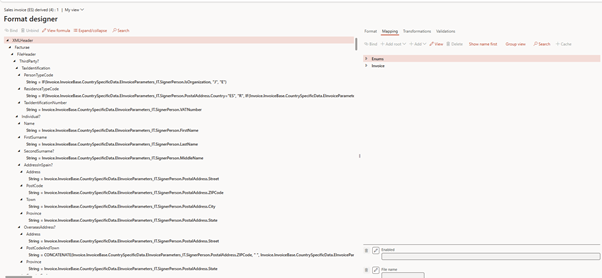
- It defines how data should be transformed (via ER formats),
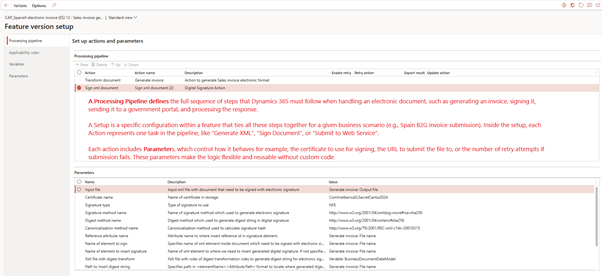
- It includes instructions for digital signing, storage, and submission, and
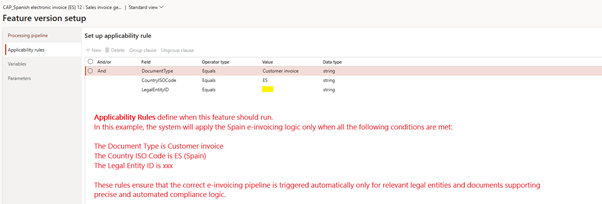
- It tells Dynamics when to run this process, based on your data (called applicability rules).
These features are version-controlled and can be published or deployed across environments making them ideal for ALM (Application Lifecycle Management).
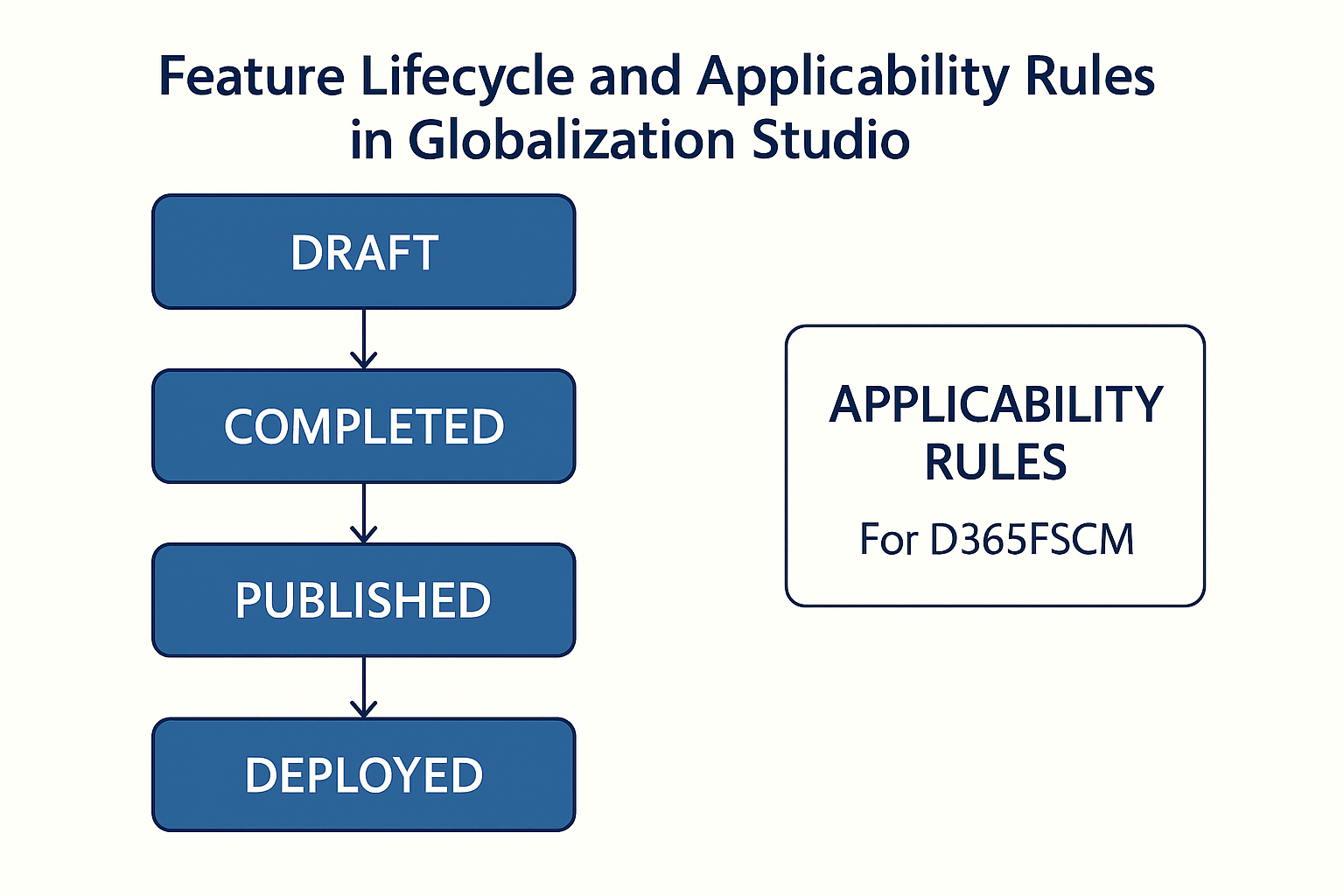
🔁 Feature Lifecycle Stages
Every feature goes through these four statuses:
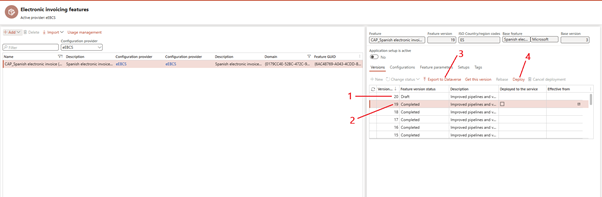
| Status | What It Means |
| Draft | You’re building or editing the feature. You can still make changes. |
| Completed | You’ve finished editing. The version is locked for safety and ready to publish. |
| Published | The feature is saved to the Dataverse repository and can be moved between environments. |
| Deployed | The feature is now live and connected to the electronic invoicing pipeline or tax logic in D365. |
🧭 Tip: You can only edit features in “Draft” mode. Once deployed, changes require a new version.
🔨 Feature Setup – Building the Logic
Inside each feature, you define one or more setups depending on your scenario:
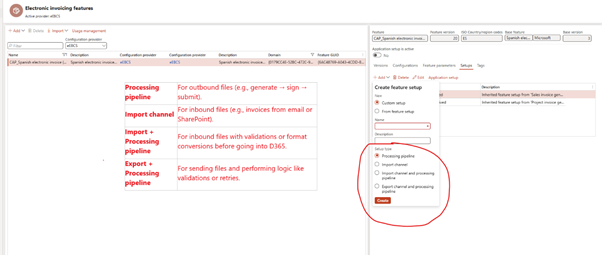
| Setup Type | Purpose |
| Processing pipeline | For outbound files (e.g., generate → sign → submit). |
| Import channel | For inbound files (e.g., invoices from email or SharePoint). |
| Import + Processing pipeline | For inbound files with validations or format conversions before going into D365. |
| Export + Processing pipeline | For sending files and performing logic like validations or retries. |
You can mix and match these setups inside one feature, depending on country needs or customer-specific requirements.
⚙️ Feature Components
When you open a feature in the Globalization Studio workspace, you’ll see tabs like:
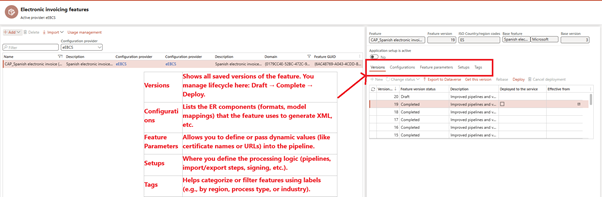
| Tab | Purpose (Layman Explanation) |
| Versions | Shows all saved versions of the feature. You manage lifecycle here: Draft → Complete → Deploy. |
| Configurations | Lists the ER components (formats, model mappings) that the feature uses to generate XML, etc. |
| Feature Parameters | Allows you to define or pass dynamic values (like certificate names or URLs) into the pipeline. |
| Setups | Where you define the processing logic (pipelines, import/export steps, signing, etc.). |
| Tags | Helps categorize or filter features using labels (e.g., by region, process type, or industry). |
Each component plays a role in building and managing your solution.
📌 Applicability Rules – Tell Dynamics When to Use It
Applicability rules are what connect your business data to the correct feature.
Let’s say:
- You sell in the UK and Italy,
- UK invoices need PDF, and
- Italy requires FatturaPA in XML.
You don’t want both features running all the time.
So you create rules like:
- LegalEntity = “ContosoUK” → Use UK invoice feature
- LegalEntity = “ContosoIT” and DocumentType = “Invoice” → Use Italian feature
These rules are built using dropdowns and logic (Equals, Begins With, etc.). You can even group them with AND/OR logic.
🇬🇧 Real Example: United Kingdom
Let’s say Contoso UK needs to:
- Generate PDF invoices,
- Add a barcode to the layout,
- Store it in Azure Blob.
You would:
- Create a new feature called “UK Sales Invoice”
- Add a processing pipeline: Format → Sign → Store
- Set applicability rule: LegalEntity = “CONTUK”
Now, every invoice from CONTUK goes through this pipeline automatically.
🇩🇪 Real Example: Germany (Out-of-the-Box)
Germany requires XRechnung (public B2G invoicing format).
You would:
- Import Microsoft’s Germany XRechnung feature
- Deploy it to your environment
- Optionally clone it for customizations
Microsoft provides the formats and actions; you simply apply them with minimal config.
🔐 Security Setup Reminder
To access or deploy features using Dataverse, users must be assigned correct roles:
- Grant Create, Read, Write, Delete, Append, Assign on:
- Globalization Features Index File
- Electronic Reporting Configurations
- ER Configuration Files
See Microsoft Docs – Assign Security Roles if needed.
🧩 Related Articles
- See GS505 – How to Create Your Own Feature from Scratch
- See GS506 – Understanding Processing Pipelines and Actions
- See GS513 – Configurable Business Documents (BDM) for modifying Word-based layouts
- See GS520 – Tax Calculation Service Basics
📘 Coming Up Next
In GS505 – Creating a Feature from Scratch, we’ll walk through building a real-world feature step by step—using Spain’s e-invoicing scenario as our example.
You’ll learn how to:
- Set up a processing pipeline
- Attach an ER configuration
- Define applicability for a specific legal entity
- Deploy and test your feature—all without custom code
📖 Continue reading: GS505 – Build Your First Feature →
Share this content:










Post Comment