




MH512 – Integrating External WMS with D365FO MHAX: Completing Putaway Transactions via Logic App HTTP Trigger

Introduction

In this article, we’ll walk you through the step-by-step process of completing the workflow for sending Putaway transaction data from an external Warehouse Management System (WMS) to Dynamics 365FO using an HTTP trigger and POST action in Azure Logic Apps. Additionally, I’ll demonstrate how to properly close the transaction in Dynamics to ensure smooth synchronization between systems. This guide will help you automate the final stages of the integration, ensuring that sales order picklist transactions are accurately processed and reflected in D365FO.


Goal

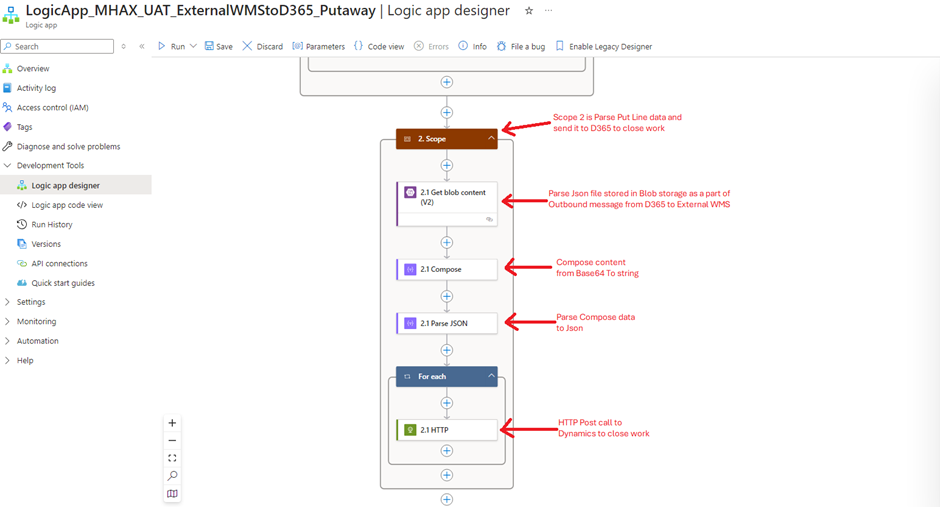
Note – both screenshots represent single worklow. I had to take two different screenshot due to lake of capturing single screenshot of entire logic app workflow.

Pick Line
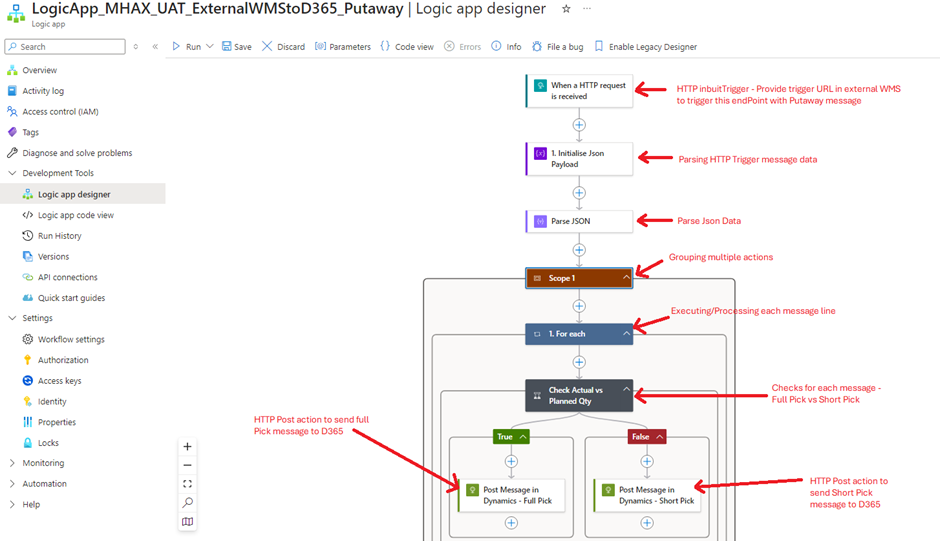
image-97 MH512 - Integrating External WMS with D365FO MHAX: Completing Putaway Transactions via Logic App HTTP Trigger

Put Line

image-98 MH512 - Integrating External WMS with D365FO MHAX: Completing Putaway Transactions via Logic App HTTP Trigger

Configuring workflow – Step by Step

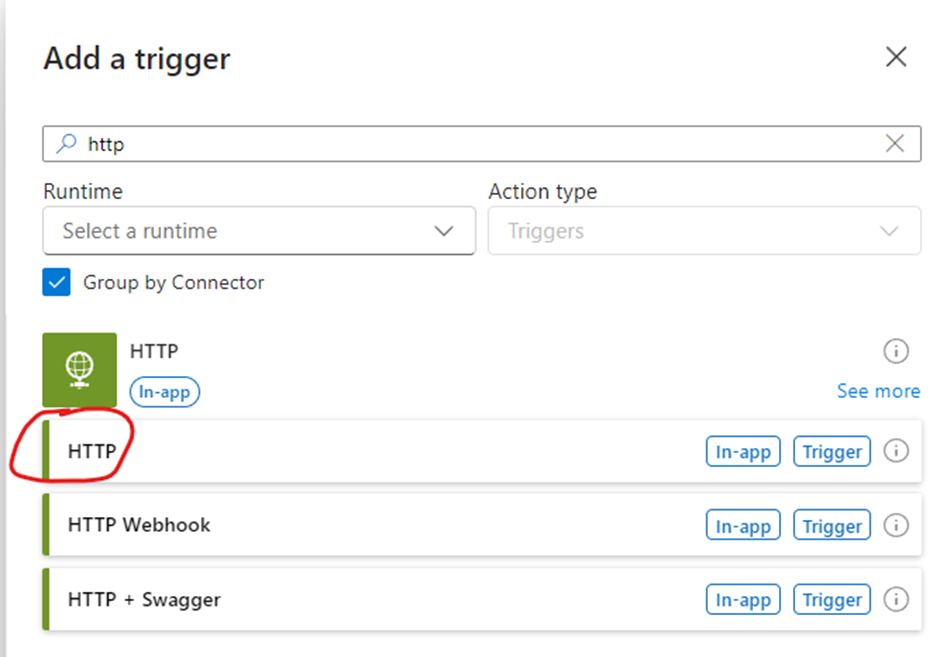
1.  HTTP Trigger

  • Add trigger
image-99 MH512 - Integrating External WMS with D365FO MHAX: Completing Putaway Transactions via Logic App HTTP Trigger
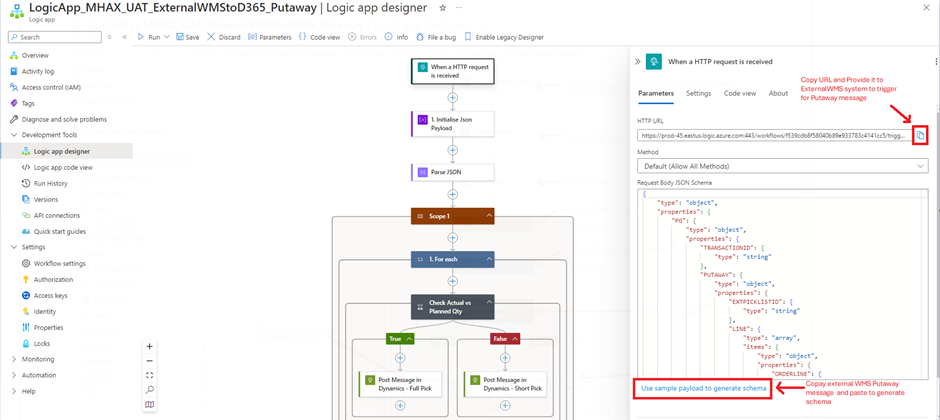
  • Configure trigger
image-100 MH512 - Integrating External WMS with D365FO MHAX: Completing Putaway Transactions via Logic App HTTP Trigger

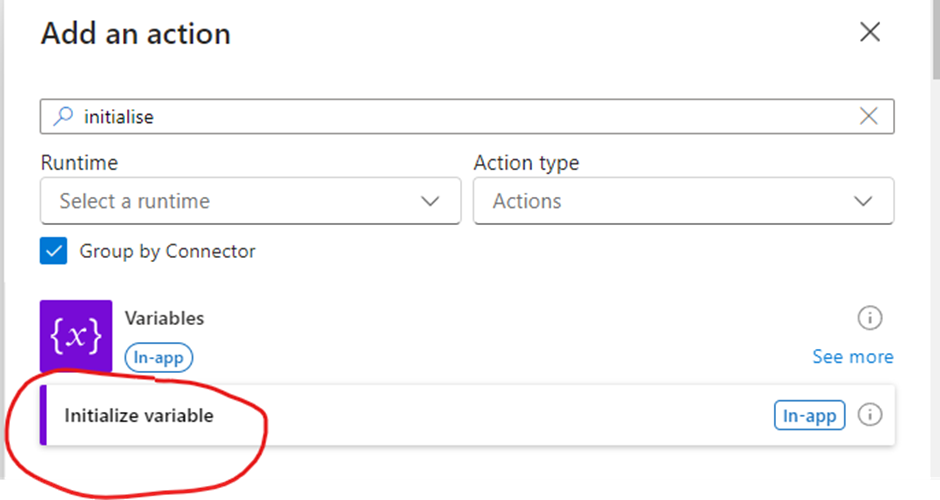
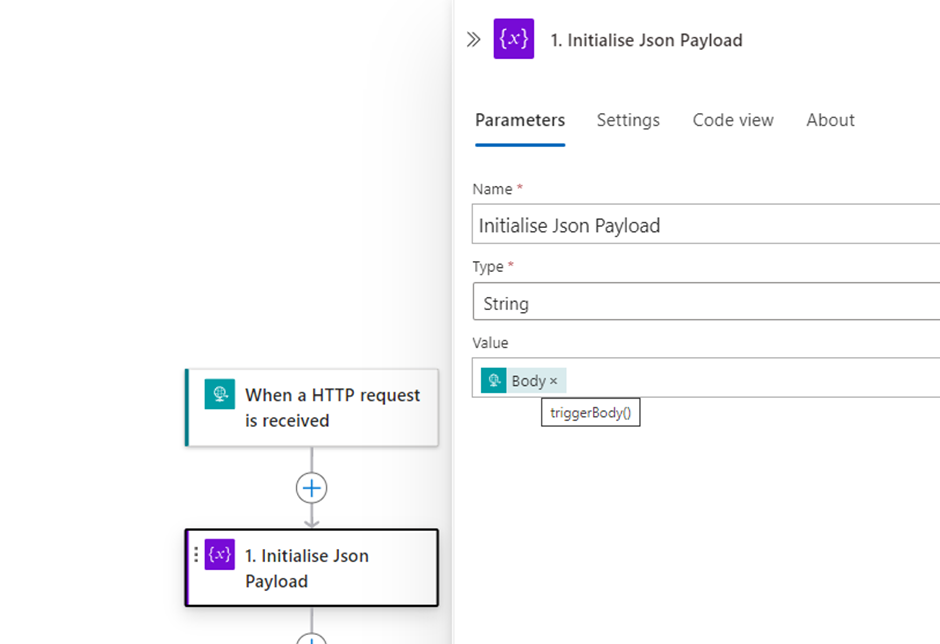
2. Initialise variable

  • Add action
image-101 MH512 - Integrating External WMS with D365FO MHAX: Completing Putaway Transactions via Logic App HTTP Trigger
  • Configure action
image-102 MH512 - Integrating External WMS with D365FO MHAX: Completing Putaway Transactions via Logic App HTTP Trigger

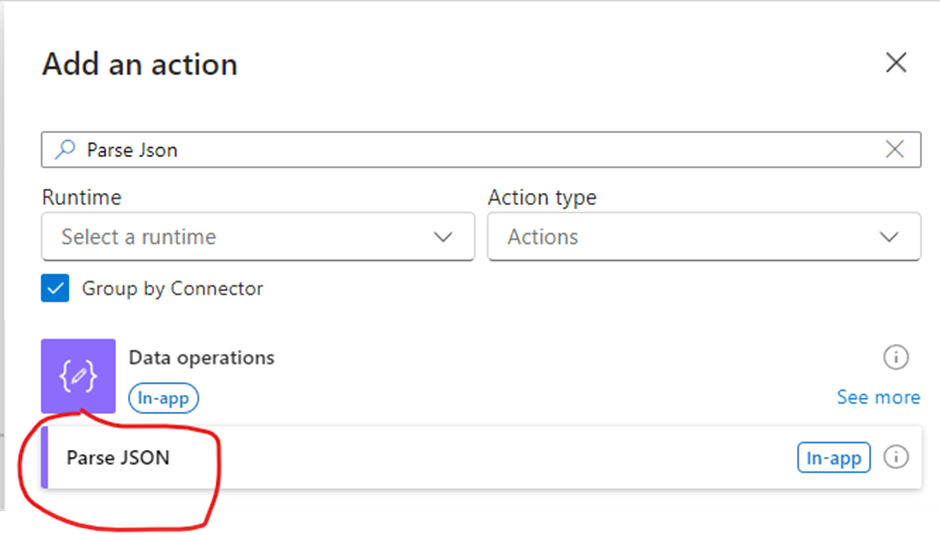
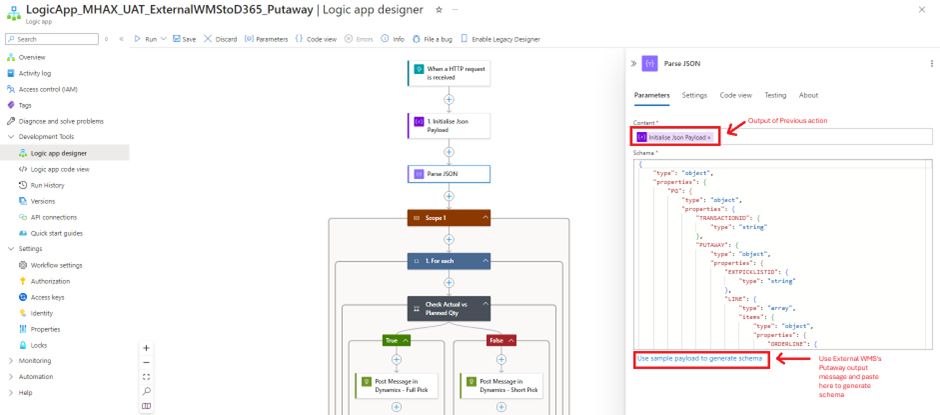
3. Parse Json

  • Add Action
image-103 MH512 - Integrating External WMS with D365FO MHAX: Completing Putaway Transactions via Logic App HTTP Trigger
  • Configure Action
image-104 MH512 - Integrating External WMS with D365FO MHAX: Completing Putaway Transactions via Logic App HTTP Trigger

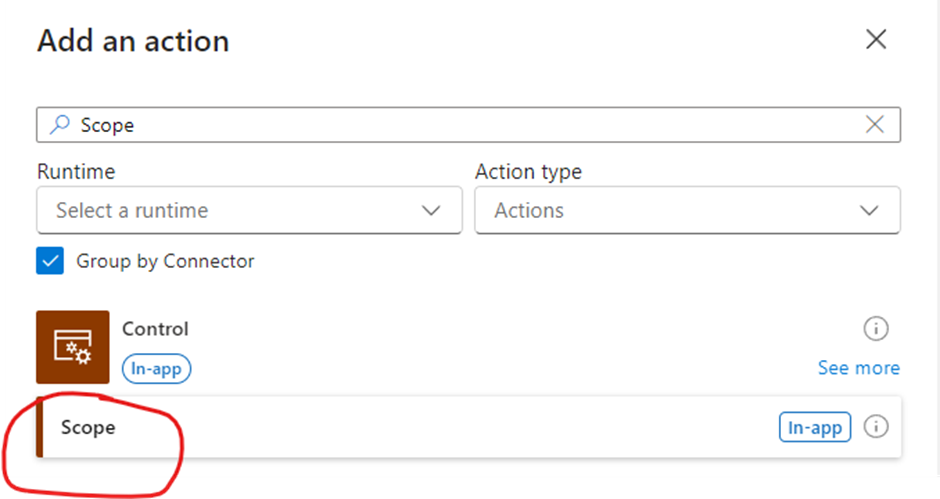
4. Scope

image-105 MH512 - Integrating External WMS with D365FO MHAX: Completing Putaway Transactions via Logic App HTTP Trigger

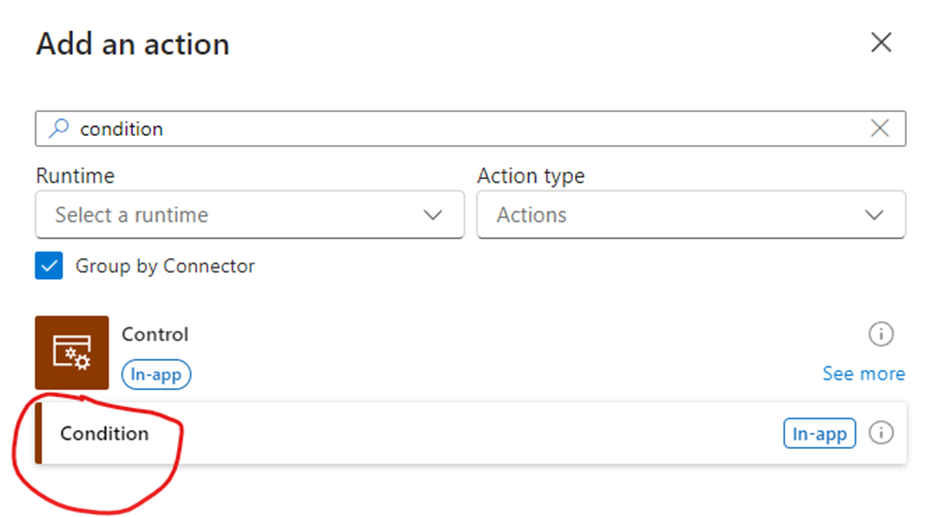
5. Condition

  • Add Action
image-106 MH512 - Integrating External WMS with D365FO MHAX: Completing Putaway Transactions via Logic App HTTP Trigger
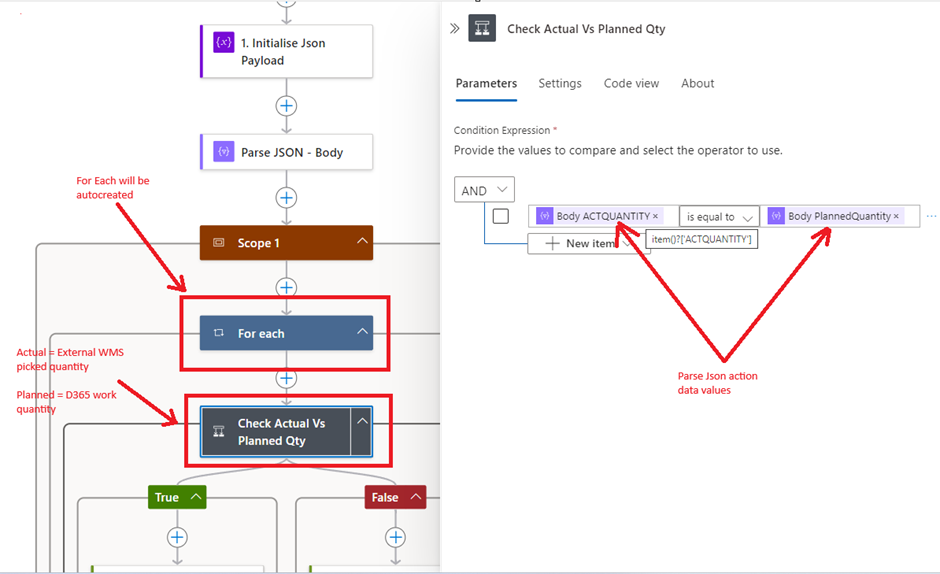
  • Configure condition
image-107 MH512 - Integrating External WMS with D365FO MHAX: Completing Putaway Transactions via Logic App HTTP Trigger

6. True condition

  • Configure

D365 MHAX Inbound message API –

https://XXXX.dynamics.com/api/services/WMHEServices/WMHEService/executeInboundTransaction
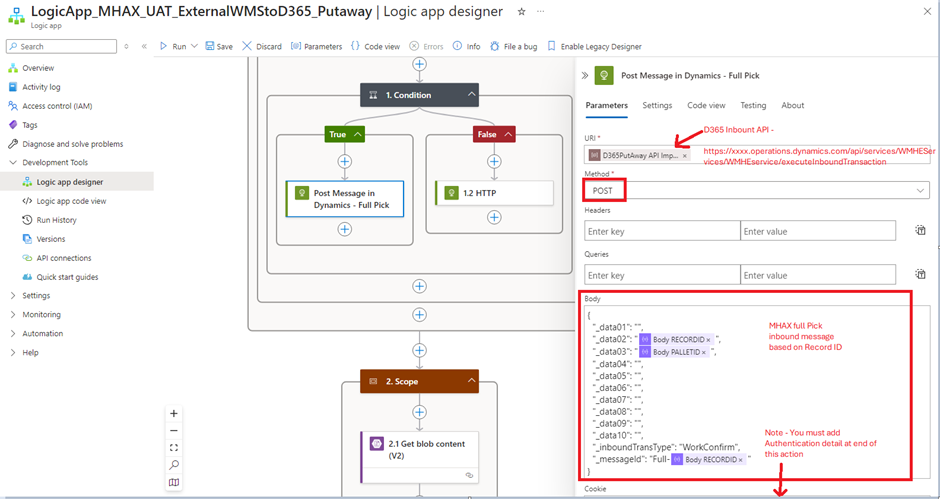
image-108 MH512 - Integrating External WMS with D365FO MHAX: Completing Putaway Transactions via Logic App HTTP Trigger

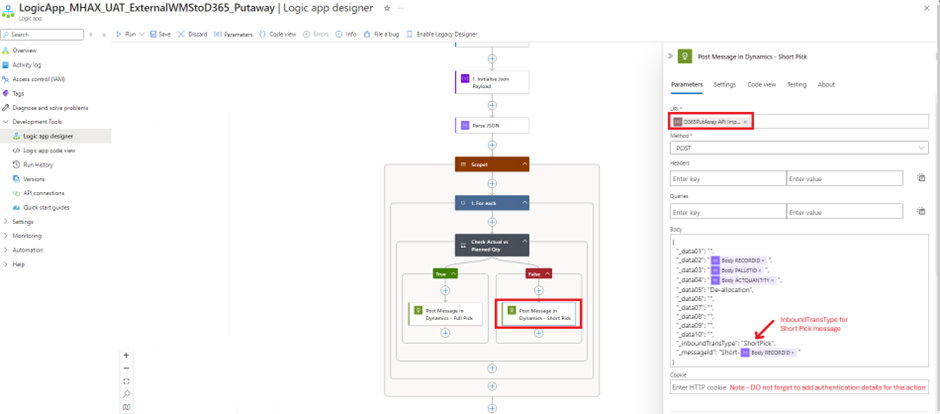
7. False condition

  • Configure
image-109 MH512 - Integrating External WMS with D365FO MHAX: Completing Putaway Transactions via Logic App HTTP Trigger

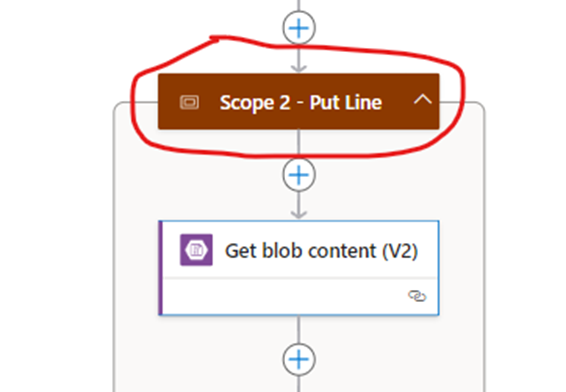
8. Scope2 for Put line

  • Add Action
image-110 MH512 - Integrating External WMS with D365FO MHAX: Completing Putaway Transactions via Logic App HTTP Trigger

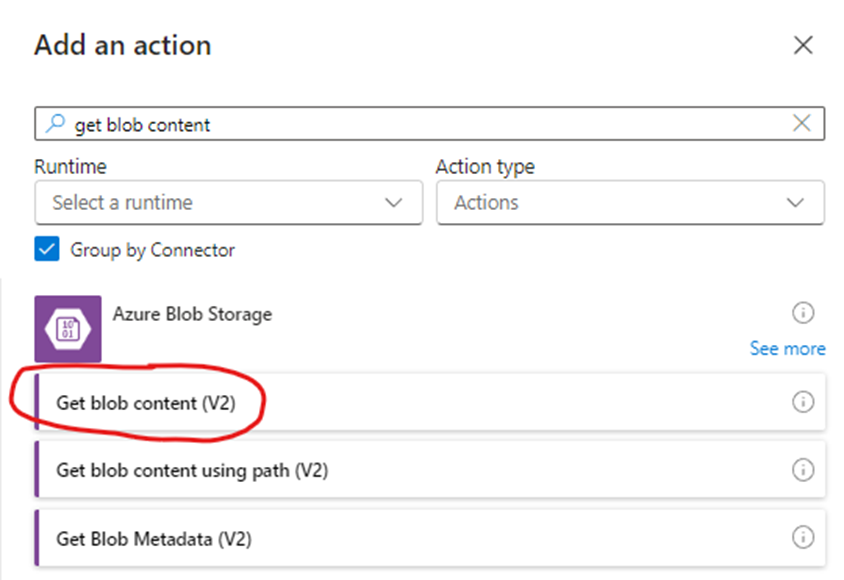
9.  Get Blob Content

  • Add Action
image-111 MH512 - Integrating External WMS with D365FO MHAX: Completing Putaway Transactions via Logic App HTTP Trigger
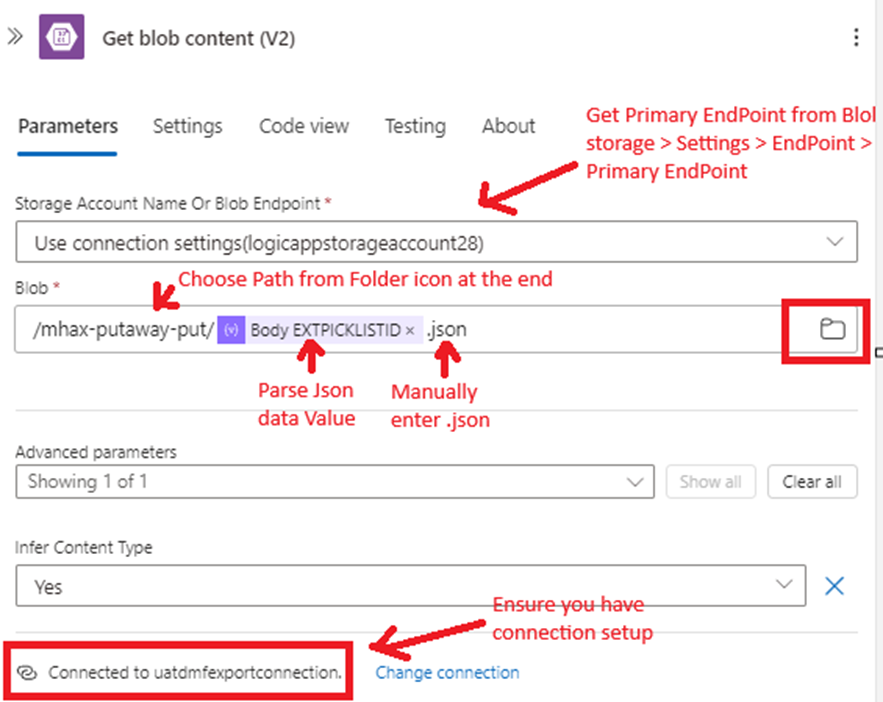
  • Configure Action
image-112 MH512 - Integrating External WMS with D365FO MHAX: Completing Putaway Transactions via Logic App HTTP Trigger

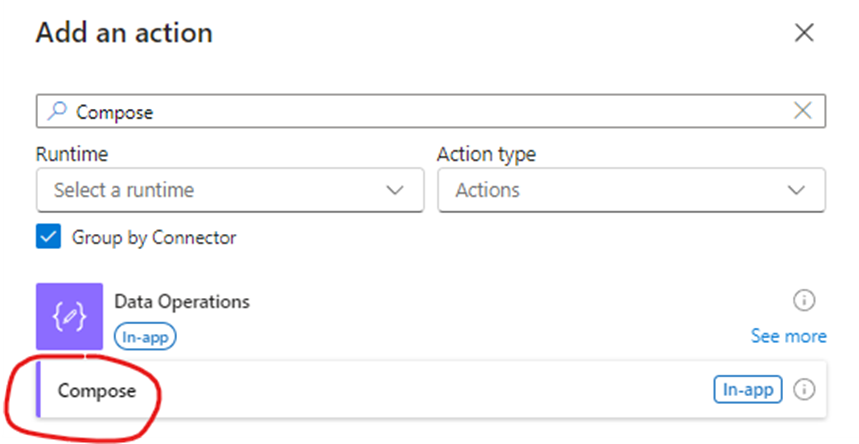
10. Compose – Get content

  • Add Action
image-113 MH512 - Integrating External WMS with D365FO MHAX: Completing Putaway Transactions via Logic App HTTP Trigger
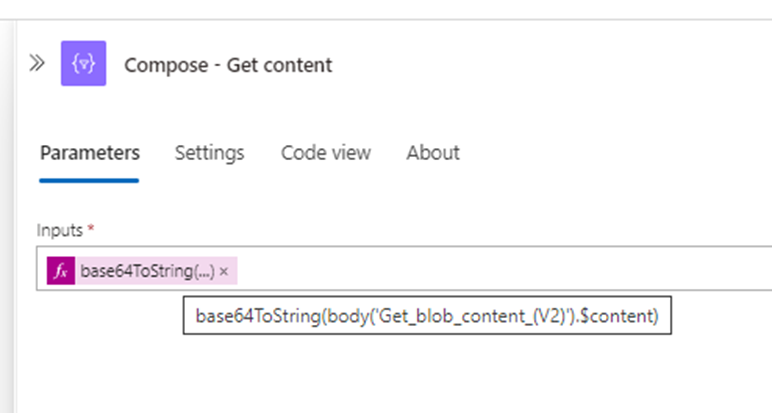
  • Configure Action
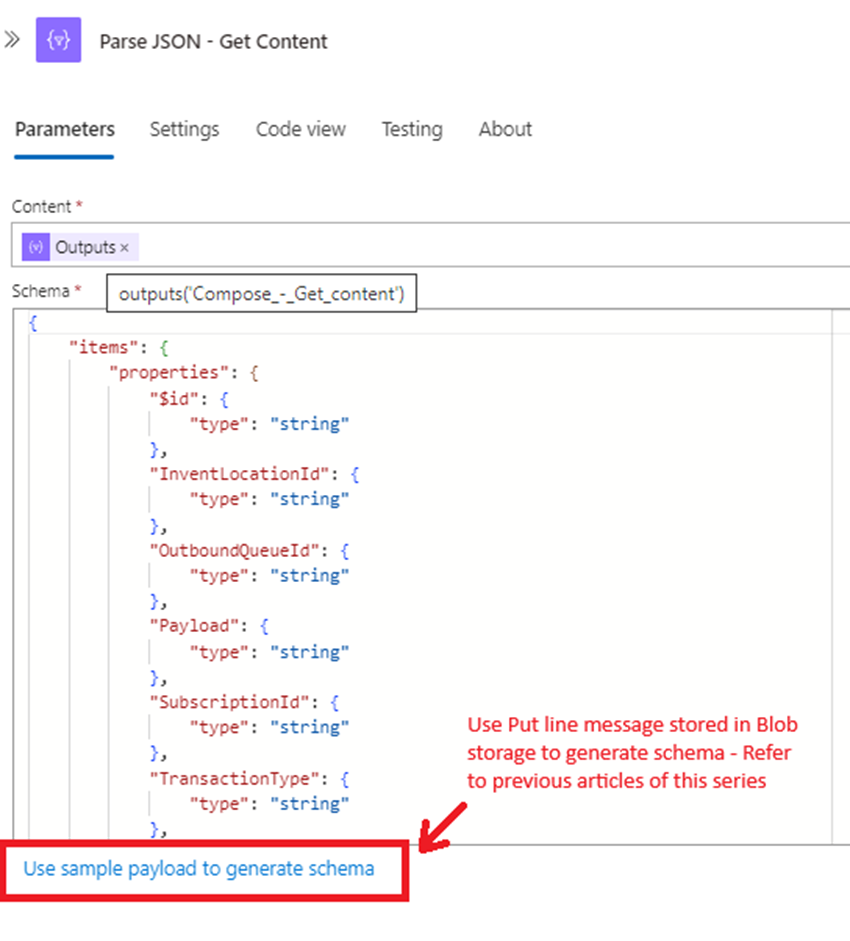
image-114 MH512 - Integrating External WMS with D365FO MHAX: Completing Putaway Transactions via Logic App HTTP Trigger

11. Parse Json

  • Configure Action
image-115 MH512 - Integrating External WMS with D365FO MHAX: Completing Putaway Transactions via Logic App HTTP Trigger

12. HTTP Post

  • Configure Action
image-116 MH512 - Integrating External WMS with D365FO MHAX: Completing Putaway Transactions via Logic App HTTP Trigger

Run and Test

Putaway test

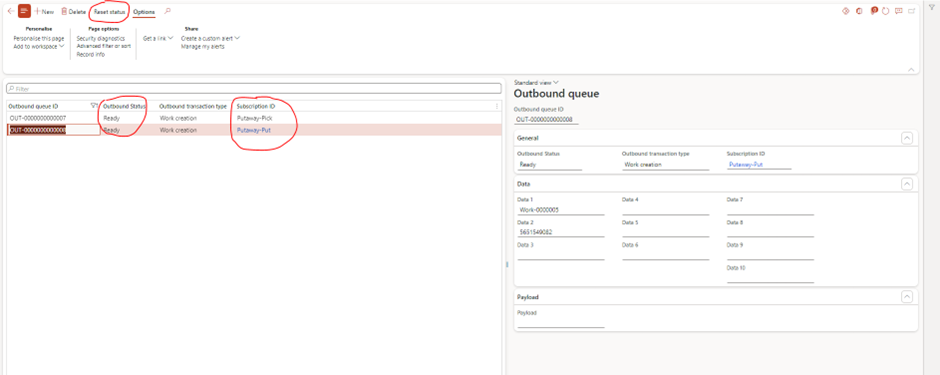
1. Reset status of existing message. Feel free to create new transaction.
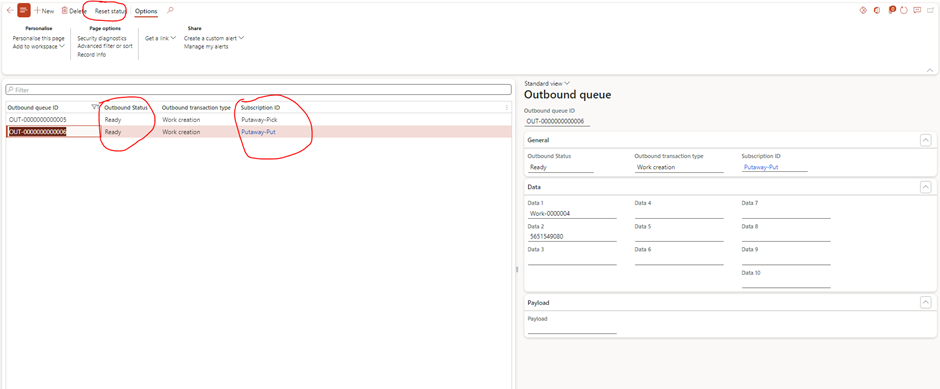
image-117 MH512 - Integrating External WMS with D365FO MHAX: Completing Putaway Transactions via Logic App HTTP Trigger

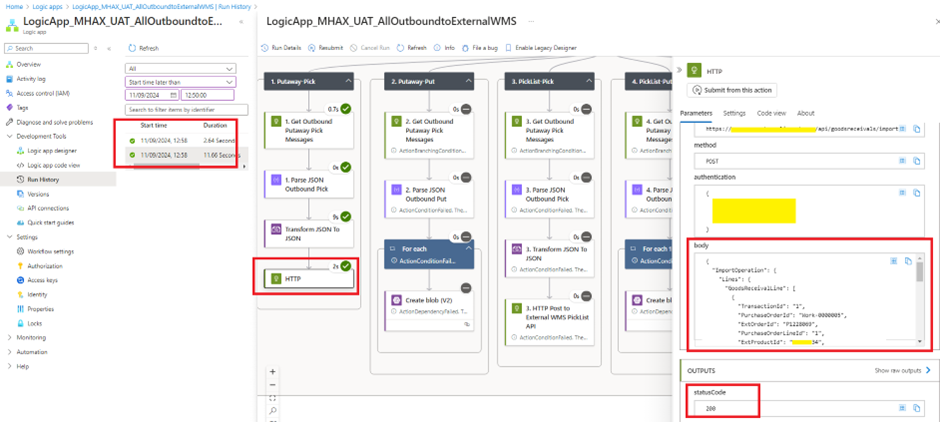
2. Verify Logic app run

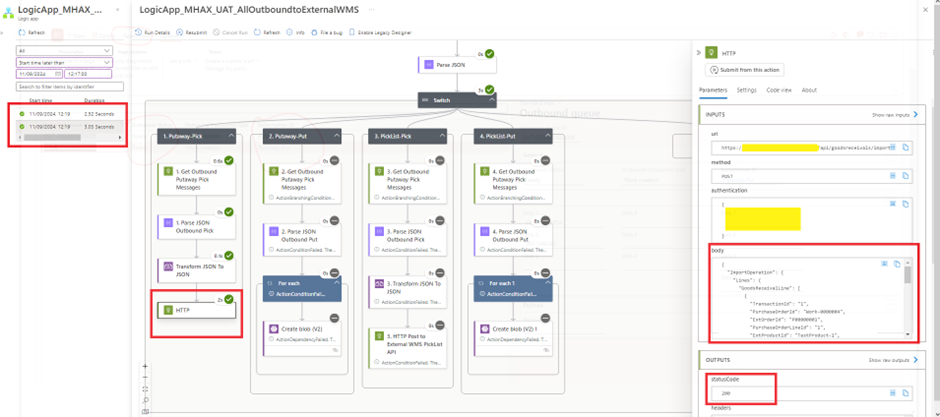
image-118 MH512 - Integrating External WMS with D365FO MHAX: Completing Putaway Transactions via Logic App HTTP Trigger

3. Verify Transaction in your External WMS system

4. Complete Putaway in External WMS

5. Ensure External WMS is sending Pick List message to Logic app trigger endpoint

6. Once Triggered, Verify Logic app
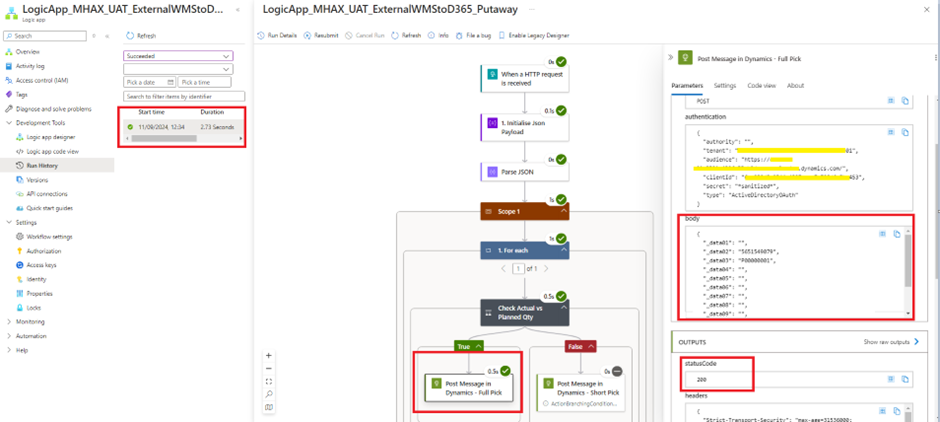
image-119 MH512 - Integrating External WMS with D365FO MHAX: Completing Putaway Transactions via Logic App HTTP Trigger

7. Verify Put line message parsed correctly
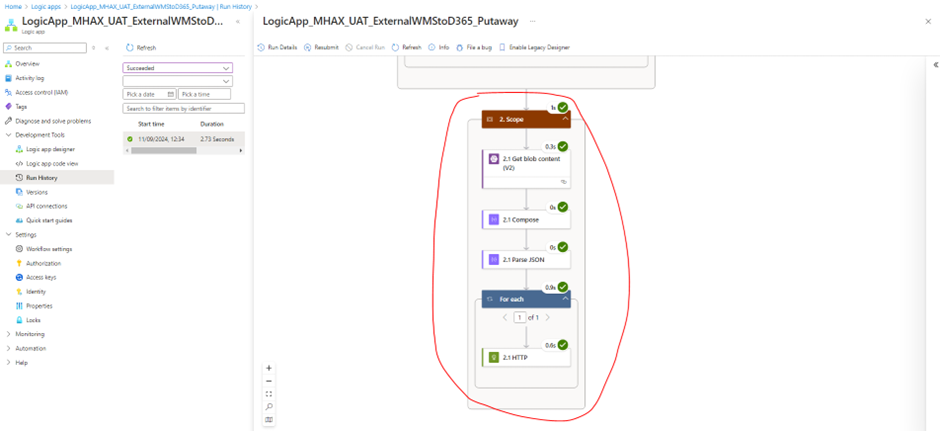
image-120 MH512 - Integrating External WMS with D365FO MHAX: Completing Putaway Transactions via Logic App HTTP Trigger

8. Verify MHAX Inbound queue

image-121 MH512 - Integrating External WMS with D365FO MHAX: Completing Putaway Transactions via Logic App HTTP Trigger

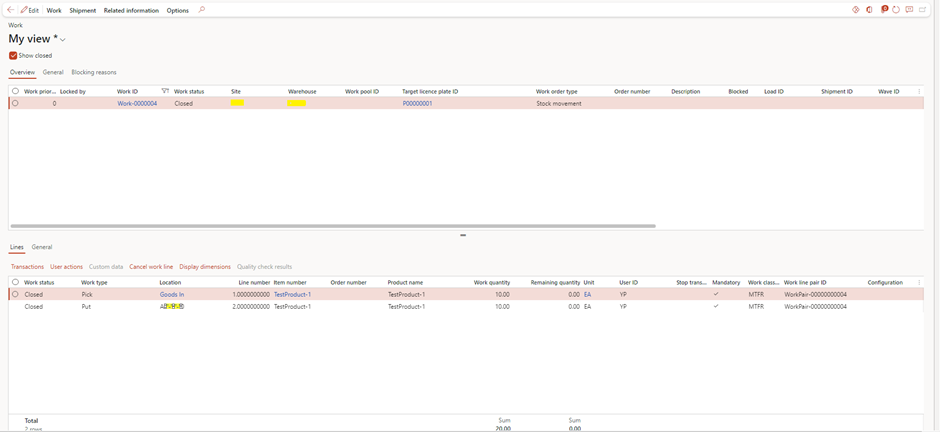
9. Verify Closure of Work

image-122 MH512 - Integrating External WMS with D365FO MHAX: Completing Putaway Transactions via Logic App HTTP Trigger

Short Pick

1. Reset status of existing message. Feel free to create new transaction.

image-123 MH512 - Integrating External WMS with D365FO MHAX: Completing Putaway Transactions via Logic App HTTP Trigger

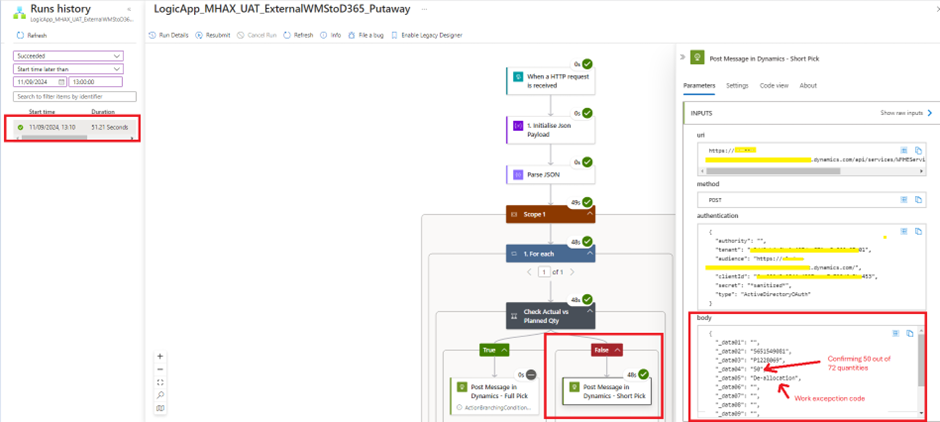
2. Verify Logic app run

image-124 MH512 - Integrating External WMS with D365FO MHAX: Completing Putaway Transactions via Logic App HTTP Trigger

3. Verify Transaction in your External WMS system

4. Complete Putaway in External WMS – ShortPicking

5. Ensure External WMS is sending Putaway message to Logic app trigger endpoint

6. Once Triggered, Verify Logic app

image-125 MH512 - Integrating External WMS with D365FO MHAX: Completing Putaway Transactions via Logic App HTTP Trigger

7. Verify Put line message parsed correctly

8. Verify MHAX Inbound queue

image-126 MH512 - Integrating External WMS with D365FO MHAX: Completing Putaway Transactions via Logic App HTTP Trigger

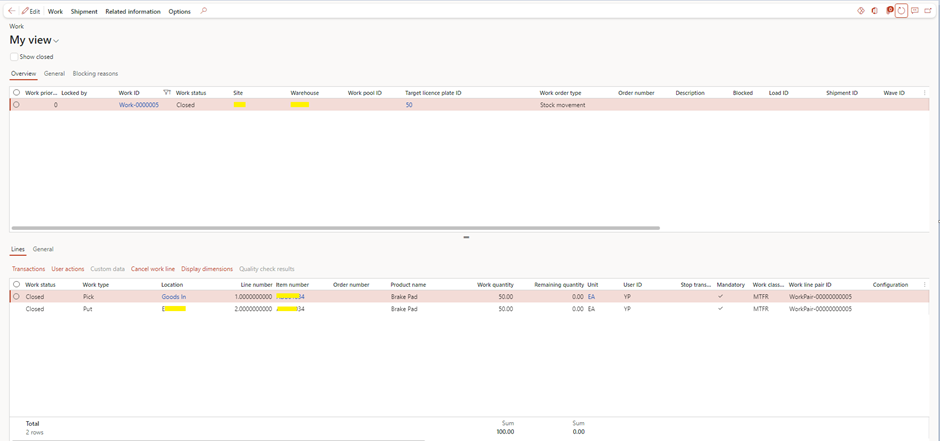
9. Verify Closure of Work

image-127 MH512 - Integrating External WMS with D365FO MHAX: Completing Putaway Transactions via Logic App HTTP Trigger

Expand Your Knowledge: See More Material Handling Blogs

Share this content:

I am Yogeshkumar Patel, a Microsoft Certified Solution Architect and Enterprise Systems Manager with deep expertise across Dynamics 365 Finance & Supply Chain, Power Platform, Azure, and AI engineering. With over six years of experience, I have led enterprise-scale ERP implementations, AI-driven and agent-enabled automation initiatives, and secure cloud transformations that optimise business operations and decision-making. Holding a Master’s degree from the University of Bedfordshire, I specialise in integrating AI and agentic systems into core business processes streamlining supply chains, automating complex workflows, and enhancing insight-driven decisions through Power BI, orchestration frameworks, and governed AI architectures. Passionate about practical innovation and knowledge sharing, I created AIpowered365 to help businesses and professionals move beyond experimentation and adopt real-world, enterprise-ready AI and agent-driven solutions as part of their digital transformation journey. 📩 Let’s Connect: LinkedIn | Email 🚀

Post Comment

Table of Content