

SB510 – Recurring Contract Billing Setup in D365: Parameters, Templates, and Configuration Deep Dive
🌐 Introduction
Welcome to SB510 in our Subscription Billing series! Now that we’ve explored invoicing logic in SB509, it’s time to get under the hood and configure the Recurring Contract Billing setup that powers the module.
In this post, we’ll walk through all the critical setup areas you’ll find under:
📍 Subscription Billing > Recurring Contract Billing > Setup
Each section directly influences how billing schedules behave—from CPI escalations and milestone recognition to termination rules and revenue splits.
We’ll use the CRM SaaS model throughout to show how each configuration fits into a real-world scenario.
🧾 Setup Areas Overview
Here’s a quick breakdown of the setup sections you’ll learn in this post:
| Group | Focus |
| Billing parameters | Default rules for proration, invoice type, alignment |
| Groups & codes | Templates for schedules, milestones, renewals, termination |
| Pricing & escalation | CPI index schedules, revenue splits |
| Customer and item setup | End users, items, and contract control settings |
Let’s explore them one by one.
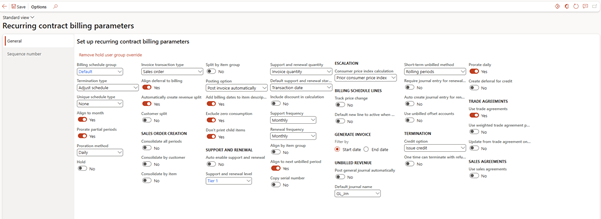
Recurring Contract Billing Parameters
📍 Path: Recurring contract billing > Setup > Recurring contract billing parameters
This is where you define global behaviors for billing.
Key Fields:
| Field | Description |
| Align to month | Forces billing periods to match calendar months |
| Prorate partial periods | Prorates the amount if contract starts/stops mid-month |
| Proration method | Daily vs. Monthly proration logic |
| Default invoice type | Sales order or free text (can be overridden at line level) |
| Auto-enable renewals | Automatically adds renewal lines to schedules |
| Use trade agreements | Pulls pricing from sales price or trade agreement |
💡 For CRM SaaS: Enable month alignment, daily proration, and sales order invoicing.
Billing Schedule Group
📍 Path: Setup > Billing schedule group
Think of this as a template for frequently used billing patterns.
Setup Example:
- Name: CRM-Monthly
- Frequency: Monthly
- Pricing method: Flat
- Item type: Standard
- Invoice separately: No
- Auto-renew: Yes
- Lines per renewal: 12
- Escalation: Yes
💡 All new CRM contracts can use this group for consistency.

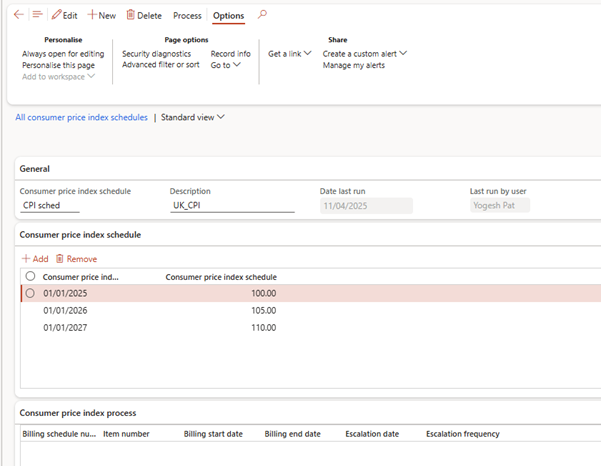
Consumer Price Index (CPI) Schedule
📍 Path: Setup > Consumer price index schedule
Use this to set up inflation-linked escalation tables. Each CPI schedule includes:
- Effective date
- % increase
- Description (e.g., 2024 CPI UK)
💡 Used with SBX-RNW-ANN1 to escalate CRM renewals annually.
Items
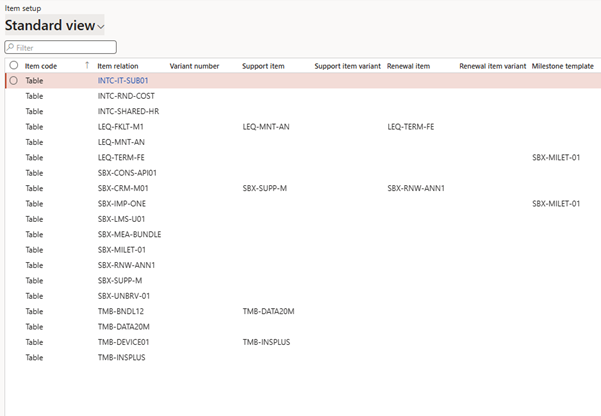
📍 Path: Setup > Items
This shows which items are used in billing schedules and their attributes.
Typical entries:
- SBX-CRM-M01 – CRM Subscription
- SBX-CONS-API01 – API Usage
- SBX-RNW-ANN1 – Annual Renewal
- SBX-MILET-01 – Milestone Setup Fee
💡 Ensure each item is properly linked to deferral templates and revenue profiles.
Unbilled Revenue Setup
📍 Path: Setup > Unbilled revenue setup
Used if you’re using the Revenue and Expense Deferral module later.
It controls:
- GL account for unbilled revenue
- Posting logic for unearned income
💡 Will be covered further in SB513 when we get to deferrals.
Support and Renewal Levels
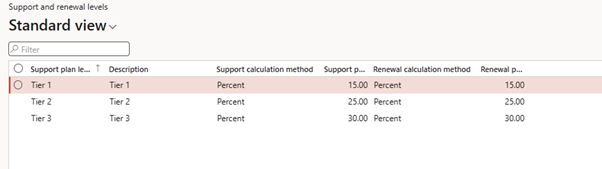
📍 Path: Setup > Support and renewal levels
Create predefined support tiers or renewal types to apply to billing lines.
Example:
| Level | Description | Auto-renew |
| Tier 1 | Basic CRM Support | Yes |
| Tier 2 | Advanced Tech Assist | Yes |
💡 Helps standardise billing rules across contracts.
Milestone Templates
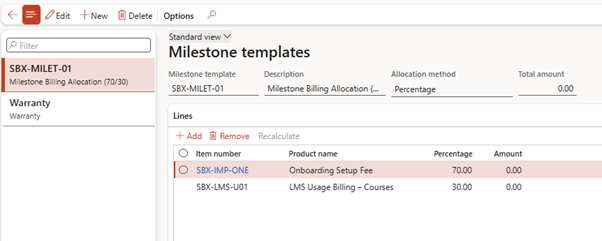
📍 Path: Setup > Milestone templates
Used for milestone-type billing lines, especially in implementation services.
Example:
| Milestone | % Amount | Trigger |
| Onboarding Complete | 70% | Manual trigger |
| LMS Access Granted | 30% | Manual trigger |
💡 Applied to SBX-MILET-01 in LMS-based projects.
End Users
📍 Path: Setup > End users
Tracks the actual consumer of the service (different from invoice account). Helpful when:
- Selling through resellers
- Assigning support by user
- Tracking usage per named license
💡 Optional but valuable for usage or multi-entity subscriptions.
Hold Reason Codes
📍 Path: Setup > Hold reason codes
Used when placing billing schedules or lines on hold.
Examples:
- Payment delinquency
- Contract review pending
💡 Helps pause billing without deleting or terminating.
🔟 Termination Reason Codes
📍 Path: Setup > Termination reason codes
Standardises reasons when contracts are terminated:
Examples:
- Customer cancelled
- Product discontinued
- Non-renewal
🔢 Milestone Audit Reason Codes
📍 Path: Setup > Milestone audit reason code
Used to document why a milestone was billed—ensuring compliance and audit trail.
💡 Optional but improves transparency in service-based billing.
🔄 Customer Split Reason Code
📍 Path: Setup > Customer split reason code
Used when a billing schedule is split between two customers.
Example:
- Parent company vs branch
- Internal + external stakeholders
🔁 Revenue Split Template
📍 Path: Setup > Revenue split template
Create predefined split rules across items in a bundle.
Example:
- SBX-MEA-BUNDLE (CRM + Support + API)
- Define:
- CRM: 50%
- Support: 30%
- API: 20%
✅ Summary
This article covered the entire Recurring Contract Billing setup framework that controls every behaviour in your subscription lifecycle—from proration to renewal, escalation to bundling.
| Setup Area | Purpose | Example Use in CRM SaaS |
| Parameters | Global billing logic | Align to month = Yes |
| Billing group | Reusable contract template | CRM-Monthly |
| CPI Schedule | Escalation logic | 5% yearly price uplift |
| Support/Renewal levels | Tiered service structures | Advanced CRM support |
| Milestone templates | Progress-based billing | 70/30 onboarding split |
| Revenue split template | Allocate bundled revenue | SBX-MEA-BUNDLE |
🔜 Coming Up Next: SB511 – All Enquiries & Reports in Recurring Contract Billing
In SB511, we’ll shift focus to the monitoring side—covering all the reports and enquiry forms in D365 Subscription Billing. We’ll use table format to explain each report’s:
- Description
- Use Case
- Best Practices
Perfect for finance users, billing analysts, and auditors.
Expand Your Knowledge: See More Subscription Billing Blogs
Share this content:












Post Comment